Cloud Backup Solutions for Businesses: How to Protect Data and Recover Faster
But data can disappear unexpectedly. A ransomware attack, accidental deletion, hardware failure, software issue, employee mistake, or even a natural disaster can disrupt access to critical information.
Cloud backup allows organizations to securely copy and store their business data in cloud-based environments, so it can be recovered when the original data is damaged, deleted, compromised, or unavailable. Unlike traditional backup approaches that may depend heavily on physical infrastructure, cloud-based backups can provide automated protection, scalable storage, remote accessibility, and faster recovery.
For modern businesses operating across cloud, on-premises, and hybrid environments, cloud backup is increasingly becoming an important part of data protection and business continuity.
What Are Cloud Backup Solutions for Businesses?
Cloud backup is a data protection method in which copies of business data are stored in a secure cloud environment.
Depending on the business requirement, organizations can back up files, databases, virtual machines, applications, servers, SaaS data, and other workloads. Backups can be scheduled automatically based on how frequently data changes and how quickly it needs to be recovered.
For example, a financial services company that updates customer transaction records throughout the day may require more frequent backups than a small business that primarily stores documents.
Cloud backup should not simply be viewed as another place to store files. A well-designed backup strategy considers how data is protected, how long it is retained, who can access it, and how quickly it can be restored after an incident.
AWS recommends defining backup frequency, monitoring, retention requirements, and recovery objectives as part of a comprehensive backup strategy.
Why Businesses Need Cloud Backup
The volume and importance of business data continue to grow. At the same time, organizations face increasing risks from cyberattacks and operational disruptions.
Ransomware is one of the biggest reasons businesses need reliable backups. Attackers can encrypt production data and demand payment for its recovery. In more advanced attacks, criminals may also attempt to compromise backup environments because destroying recovery options can increase pressure on the victim.
Veeam's 2025 ransomware research, based on a survey of 1,300 organizations, highlighted the importance of backup verification, backup copies, alternative infrastructure, containment, and predefined recovery processes.
A secure cloud backup strategy gives businesses another layer of protection. Instead of relying on the compromised production environment, organizations can restore data from a protected recovery point.
Microsoft's current Azure guidance similarly emphasizes secure backup storage, access control, recoverability, and governance as important pillars of backup protection.
Key Benefits of Cloud Backup Solutions for Businesses
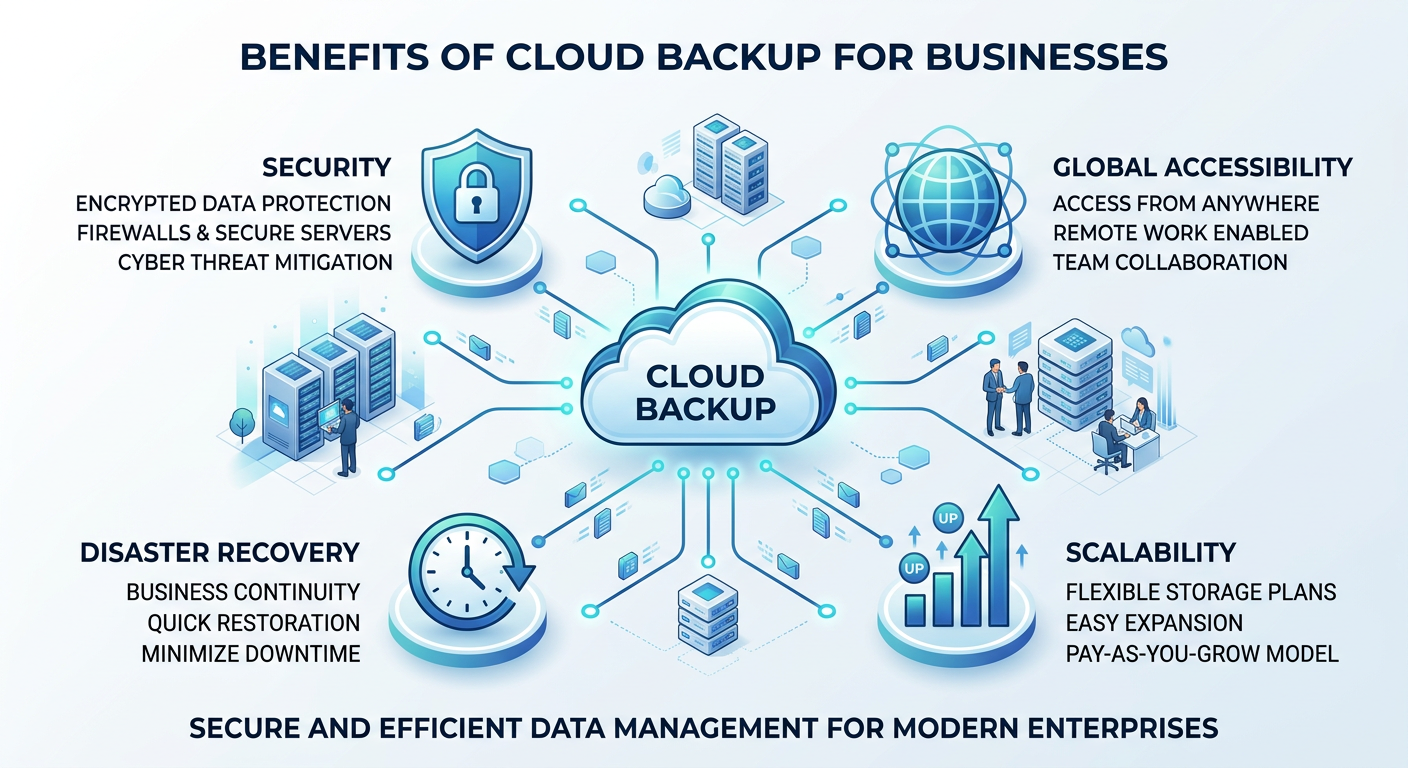
1. Protection Against Data Loss
Human mistakes remain a common cause of data loss.
An employee could accidentally delete a customer record, overwrite an important document, or remove files from a shared system. With properly configured backups, the business can restore an earlier version rather than permanently losing the information.
Versioning and point-in-time recovery can be particularly useful when businesses need to recover data from a specific moment.
2. Better Protection Against Ransomware
Backups can become an important recovery mechanism during a ransomware incident.
However, simply having a backup does not automatically make an organization's ransomware resilient. Backups should be protected from unauthorized deletion or modification and regularly tested.
Modern cloud backup architectures can use features such as immutable storage, isolated backup environments, multi-factor authentication, and restricted administrative access.
Microsoft recommends immutable backups, isolated copies, and recovery testing as part of ransomware-resilient backup architecture.
3. Scalability
Traditional backup infrastructure often requires organizations to purchase and maintain additional hardware as data volumes increase.
Cloud backup can scale more flexibly with business requirements. A growing organization can increase its protected data without necessarily building an entirely new physical backup environment.
This can be particularly valuable for businesses experiencing rapid growth, opening new locations, or moving more workloads to cloud platforms.
4. Business Continuity
A backup is valuable only when the organization can actually recover from it.
Cloud backup can support business continuity by helping organizations restore critical information after outages, cyber incidents, hardware failures, or other disruptions.
Businesses should define two important recovery objectives:
Recovery Point Objective (RPO) determines how much recent data the organization can afford to lose.
Recovery Time Objective (RTO) determines how quickly systems need to be restored.
For example, an online retailer may require a very short RPO and RTO because extended downtime could directly affect sales and customer experience.
5. Reduced Infrastructure Burden
Maintaining physical backup infrastructure requires hardware, storage capacity, maintenance, monitoring, and IT resources.
Cloud-based approaches can reduce some of this operational burden by allowing organizations to use managed cloud infrastructure and automation.
This doesn't eliminate the need for IT expertise. Businesses still need to configure policies, access controls, retention periods, monitoring, and recovery procedures correctly.
Important Features to Look for in a Business Cloud Backup Solution
Choosing a cloud backup solution should go beyond comparing storage capacity and price.
Automated Backups
Automation reduces dependence on manual processes. Businesses should be able to define backup schedules based on workload importance and data-change frequency.
Encryption
Backup data should be protected during transmission and while stored. Encryption helps reduce the risk of unauthorized access to sensitive business information.
Immutability
Immutable backups are designed to prevent protected backup data from being modified or deleted during a defined retention period.
This can be especially important during ransomware attacks where attackers may attempt to compromise backup systems.
Access Controls and MFA
Backup infrastructure should not be accessible to every administrator or user.
Role-based access, least-privilege permissions, multi-factor authentication, and separate administrative controls can help reduce the risk of unauthorized backup manipulation.
Recovery Testing
A backup that has never been tested should not automatically be considered reliable.
Organizations should periodically perform recovery tests to confirm that backups are complete, usable, and capable of meeting their recovery objectives.
Monitoring and Alerts
Backup failures can go unnoticed if there is no monitoring.
Businesses should receive alerts when scheduled backups fail; storage capacity changes unexpectedly, or suspicious activity is detected.
Real-World Use Cases of Cloud Backup
Use Case 1: Healthcare Organization
Consider a healthcare provider managing patient records, medical documents, billing information, and operational applications.
A ransomware attack could make these systems unavailable at a critical moment.
A cloud backup strategy can maintain protected recovery copies of important workloads. If production systems are compromised, the organization can work toward restoring clean recovery points while its security team investigates the incident.
For healthcare organizations, backup planning must also consider retention, privacy, access controls, and applicable regulatory requirements.
Use Case 2: E-Commerce Business
An e-commerce company may depend on databases containing customer information, inventory data, orders, and product information.
Suppose a database is accidentally corrupted during a software update.
Instead of rebuilding the database manually, the company can use an appropriate backup and point-in-time recovery process to restore the affected information.
This can reduce downtime and help the business resume normal operations faster.
Use Case 3: Manufacturing Company
Manufacturers increasingly depend on digital systems for production planning, supply-chain information, designs, ERP platforms, and operational data.
A hardware failure or cyberattack could interrupt production.
A hybrid cloud backup strategy can help protect important workloads across different environments and provide recovery options when primary systems become unavailable.
Use Case 4: Small and Medium-Sized Business
Cloud backup is not only for large enterprises.
A small professional services company may store contracts, invoices, employee documents, customer records, and project files digitally.
Instead of relying on a single laptop, external hard drive, or office server, the company can implement automated cloud backups with appropriate retention and access controls.
This provides an additional layer of protection without requiring a large dedicated backup infrastructure.
Cloud Backup and the 3-2-1 Strategy
One commonly used principle for data protection is the 3-2-1 backup strategy.
It means maintaining:
-
Three copies of important data
-
Two different types of storage or media
-
One copy stored offsite
For stronger ransomware resilience, organizations may extend this approach by adding an immutable or isolated copy.
Microsoft's Azure guidance recommends the 3-2-1-1 approach, including an immutable and isolated backup copy.
The important point is that businesses should avoid creating a backup environment that is completely dependent on the same credentials, infrastructure, or administrative controls as production.
Common Mistakes Businesses Make with Cloud Backup
Implementing cloud backups does not automatically guarantee data protection.
One common mistake is backing up data but never testing recovery. Another is keeping all backup copies under the same administrative account, which can increase the impact of a compromised credential.
Businesses may also select backup frequency based only on cost instead of business requirements.
For example, if a database changes every few minutes but is backed up only once per day, the organization could potentially lose many hours of data after an incident.
Another problem is failing to monitor backup jobs. A failed backup that remains unnoticed for weeks can create a dangerous false sense of security.
How Businesses Can Build a Strong Cloud Backup Strategy
A practical approach starts with identifying the organization's most critical workloads.
First, classify the data according to business importance and sensitivity. Then determine suitable RPO and RTO requirements for each workload.
Next, establish automated backup schedules, retention policies, encryption, access controls, and isolated or immutable recovery copies.
Finally, test restoration regularly.
This approach shifts backup from being a simple IT task to becoming part of the organization's broader business continuity and cybersecurity strategy.
Cloud providers such as AWS, Microsoft Azure, and Google Cloud provide backup and recovery capabilities for cloud workloads, but organizations still need to design policies and controls that match their specific business and security requirements.
How Dhanyaayai Can Help Businesses Strengthen Data Resilience
For businesses operating across cloud and hybrid environments, protecting data requires more than simply creating backup copies.
Dhanyaayai can help organizations take a broader approach to cloud, infrastructure, cybersecurity, and data resilience by aligning data protection with business continuity and security requirements.
A well-designed strategy can combine secure backup, monitoring, access controls, recovery planning, and cybersecurity practices to help organizations prepare for incidents before they occur.
The goal is simple: when business-critical data is disrupted, the organization should have a reliable path to recovery.

Conclusion
Data has become one of the most valuable assets for modern businesses, making reliable backup and recovery increasingly important.
Cloud backup solutions for businesses can help protect critical information against accidental deletion, hardware failures, cyberattacks, ransomware, and operational disruptions. But effective backup is about more than storing another copy of data in the cloud.
Organizations need to think about security, immutability, access control, recovery objectives, monitoring, retention, and—most importantly—whether their backups can actually be restored.
As businesses adopt more cloud and hybrid environments, a strong cloud backup strategy can become an essential part of business resilience.
The right approach is not simply to ask, “Are we backing up our data?”
The more important question is:
“If our primary systems fail or are attacked today, can we recover our critical business data quickly and securely?”
That is the real value of modern cloud backup.